Friday, 19 October 2012

iStayHealthy version 3.2.1 issues

I have spent a lot of time talking to users who experience iStayHealthy crashes - after they upgraded to version 3.2.1

There seems to be a common thread relating to iStayHealthy trying to sync up with iCloud.
After talking to users, the following workaround seems to resolve the issue:

  • go to the 'Settings' menu on your Home Screen
  • select the iCloud option if it is available
  • in there scroll down until you see 'Documents & Data'
  • check if 'Documents & Data' is set to 'On'
  • if it is 'OFF' - try changing it to 'On'
In the meantime, I am working hard to resolve this issue as quickly as possible

Wednesday, 17 October 2012

iStayHealthy version 3.2.1 problems

It looks like version 3.2.1 iStayHealthy for iOS still has some issues. The problems may look like this:

  • the app starts. After a while the data seem to disappear.
  • in a couple of cases users reported that the app crashes
The problem is still related to the syncing between the app and iCloud. 
The first syncing will take a bit longer. This may result in the data charts and results table not being refreshed properly.

Incidentally, when you restart the phone and app, the data reappear. 

I am really sorry about the problems and I will continue working on a solution.


Tuesday, 16 October 2012

iStayHealthy 3.2.1 for iOS published

Just got word from Apple, that they approved my latest upgrade to iStayHealthy. Version 3.2.1 has a number of bug fixes. I also worked hard to get iStayHealthy working again on iOS 6 devices that have iCloud enabled.
The new version was approved on 16 Oct - and it should be available on iTunes shortly.

Saturday, 13 October 2012

Upgrades for iStayHealthy

I had to submit upgrades for iStayHealthy - both for iOS (iPhone) and Android recently.

iOS:
A couple of users reported that iStayHealthy would hang after they updated their device to iOS version 6. This happened when they had iCloud enabled at the same time.
I submitted an upgrade to Apple on 7 Oct that should hopefully address that - and also includes other bug fixes and improvements.
Apple should be reviewing the new version shortly.

Android:
just a very minor - but important none the less - update. Version 2.0.8 was just uploaded to Google Play today 13 Oct. The new version includes the new combination drug Stribild in the mediation list.

Thursday, 20 September 2012

iStayHealthy 3.2.0, iOS6 and iCloud

iStayHealthy version 3.2.0 for iOS has been released mid-September. It has a load of new features in it including

  • additional results for saving (cholesterol, blood sugar, weight, blood pressure, cell count)
  • more intuitive menu to store side effects/missed medication
  • store previous anti HIV meds
  • and some more stuff

Just after 3.2.0 was released, Apple made its new iOS version (iOS version 6) public. I have been testing iStayHealthy on iOS 6 and so far it seems to be fine.

Except......

One user reported that iStayHealthy hangs up/exits unexpectedly after upgrading to iOS6. I looked into it and it seems to be related to iCloud being enabled as well.
Apparently, the first time you start iStayHealthy after upgrading to iOS6 iCloud syncs up the data. But doesn't finish.

Here is what I did to get iStayHealthy started up again.
  1. Go to the Settings Menu on your Home Screen and select iCloud
  2. Choose 'Documents & Data' option.
  3. If this option is switched 'On' - set it to 'Off'.
  4. Exit the Settings Menu and restart iStayHealthy. This should now work.
  5. You may try to re-enable 'Document & Data' option for iCloud again.
In the meantime I will look for a way to ensure that the sync doesn't hang up at start-up time.

Tuesday, 13 December 2011

Release Candidate for v3 of iStayHealthy/iPhone

Finished the Release Candidate for the new iPhone/iPad version of iStayHealthy last night - after ironing out the last couple of wrinkles.
I had to cut down some of the features I planned for the new version. But more about that later. Version 3.0 will have the following

  • Password enabled: users can set a passcode to protect the app from being used by people other than themselves. This was the number one on people's wish list
  • The 'Other Med' tab has been completely reworked. It now contains
    • Other Med - as before, this records any supplementary medication users want to record. Whereas before users could only specify [mg] unit as dose, they now can choose between [g], [mg], [ml].
    • Illness/Surgery: users can now record any other illnesses or infections as well as any surgeries/procedures.
    • Clinics: allows users to enter their basic clinic details. In particular their clinic ID, contact number/web-site/e-mail. Users can contact the clinic directly from the app
  • HIV Drugs tab: some changes
    • In addition to recording any missed medication, users can also record any side effects they encounter with their HIV medication.
    • the HIV tab has been slightly changed: instead of listing each individual missed medication (or side effect) it simply shows the number of recorded missed/side effects. 
  • Results
    • Viral Load for Hepatitis C co-infections can be recorded. 
  • Overall changes to the User Interface
  • Bug Fix: some of the selected HIV drugs didn't show their images in the summary HIV tab. This has now been rectified.


Sunday, 6 November 2011

Password protection for iStayHealthy

Upon popular demand I am now working on enabling password protection for iStayHealthy. I'll enable this first in the iPhone version, then the Android version.

For a while I have been resisting this step. My main rationale was: we have a lot of very sensitive data on the phone. E.g. mails, contacts, phone/SMS logs etc. If we imagine that all these apps were password enabled - it would render the usability of the phone quite cumbersome.

However, I do recognise that health data - and in particular data relating to HIV are very sensitive. Therefore, the new versions will include a Settings tool - from where users can enable password protection for the app should they so wish.

Friday, 4 November 2011

Android Maintenance version 1.0.2 on Android Market

I had to publish a maintenance update for iStayHealthy on Android today.
Version 1.0.2 addresses the following 2 issues:

  1. A possible crash when iStayHealthy is started while the phone is in landscape mode. This has been fixed. This also means that iStayHealthy can now run on tablets and later versions of Android (although the app is not optimised for tablet screen sizes).
  2. For smaller screen sizes, i.e. a density per inch of 120 or less the chart in the Charts Tab looked a bit squashed. Solution: I rearranged the Chart Tab for smaller screen sizes to allow more space for the graphics. 
Also - I submitted iStayHealthy to the Amazon Android market today. The app is currently under review.

Wednesday, 2 November 2011

Android version of iStayHealthy is published

I just published the first Android version of my app iStayHealthy on Android Market today.
Check out iStayHealthy on the Android Market!

https://market.android.com/details?id=com.pweschmidt.healthapps

The Android version has similar levels of functionality compared with its iOS counterpart.
Differences are

  • version 1.0.0 iStayHealthy for Android doesn't have DropBox backups enabled. This will come with another version
  • but version 1.0.0 iStayHealthy allows users to record side effects and not just missed medications. This is only available on Android - but I will make that available on the next iOS version, too.

Monday, 31 October 2011

Next version of iStayHealthy

The Android version of iStayHealthy is in its final testing round and should be released within the first week of November.
Time to think about further improvements for iStayHealthy. 
The next iPhone/iPad version will include the following
  • password protect/lock the application. A number of you have requested this and I will make this available with the next version
  • listing side effects. Meaning, that in addition to allowing users to put down any dates when they missed to take their medication - they will be able to list any adverse side effects they might encounter. This will be particularly useful at the beginning of the therapy
  • include more medical data in the result section: at the moment only CD4, CD4% and Viral Load. I will include a number of other blood results (like blood cell count, liver values, cholesterol)

Thursday, 20 October 2011

iStayHealthy v2.0.2 available on iTunes

The new version is now available from iTunes AppStore. With this the all the remaining iOS 5 issues should be resolved - as well as some minor improvements.


Tuesday, 18 October 2011

iStayHealthy v2.0.2 Submitted to Apple

Further fixes to make iStayHealthy work smoothly on iOS 5.
I submitted another maintenance release today. This will include the following

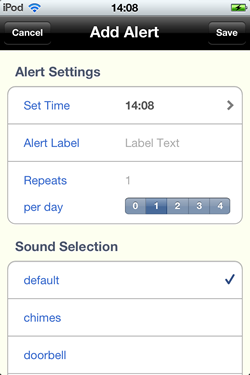
  • Fix 1: empty cells when editing an existing Result, Alert or Other Medication.
  • Fix 2: When selecting a sound in the Add/Edit Alert tool, the sound continued to play even when exiting the tool. 
  • Fix 3: In Edit Alert - sometimes the previously selected sound wasn't ticked (checkboxed)
  • Fix 4: In Edit Alert - the time label would always show the current time - instead of the previously set alert time
In addition to that I 
  1. modified the Other Medication tool slightly. Users can now change the name as well as the dose. I did that because sometimes the same medication may come in different names - even though it still is the same drug.
  2. Cleaned up most of the graphics elements. Mostly, because they were too big. 

With this iStayHealthy should be working absolutely fine on iOS 5 - just as it did on iOS4.

iStayHealthy v2.0.1 is out and available

version 2.0.1 of iStayHealthy is out and available on iTunes as of last night.
It resolves the unexpected crashes with setting/modifying repeats and sounds for notifications/alerts.

Still, there remain a couple of niggling issues:

  • sound plays on - even if you leave the Add Alert menu
  • the edit alert menu doesn't seem to take in the data from the alert it is supposed to edit.
I will work towards a speedy resolution for these problems, too.

And hopefully, hopefully we get around all these iOS 5 issues.

iOS 5 Glitches

There seems to be a number of people experiencing problems with upgrading their iPhones/iPads/iPods to iOS5.

One of the problems I encountered is, that upgrading to iOS 5 seems to loose iStayHealthy from the apps. I wonder if other people experienced the same problem.

I then reinstalled the app. It seems that all the data I put into the app previously have been saved. So there is no need to put them in again. 

Apparently, something must have gone wrong in the upgrade/syncing process.

So - message is: if you can't find the app on your iPhone/iPad after upgrading to iOS 5. simply reinstall the app. Your data should still be there.

And as mentioned in a previous blog: don't forget to set your Notifications in the Device Settings menu - in case you have any alerts (as I do).

Sunday, 16 October 2011

What happened to my alerts on iOS5?

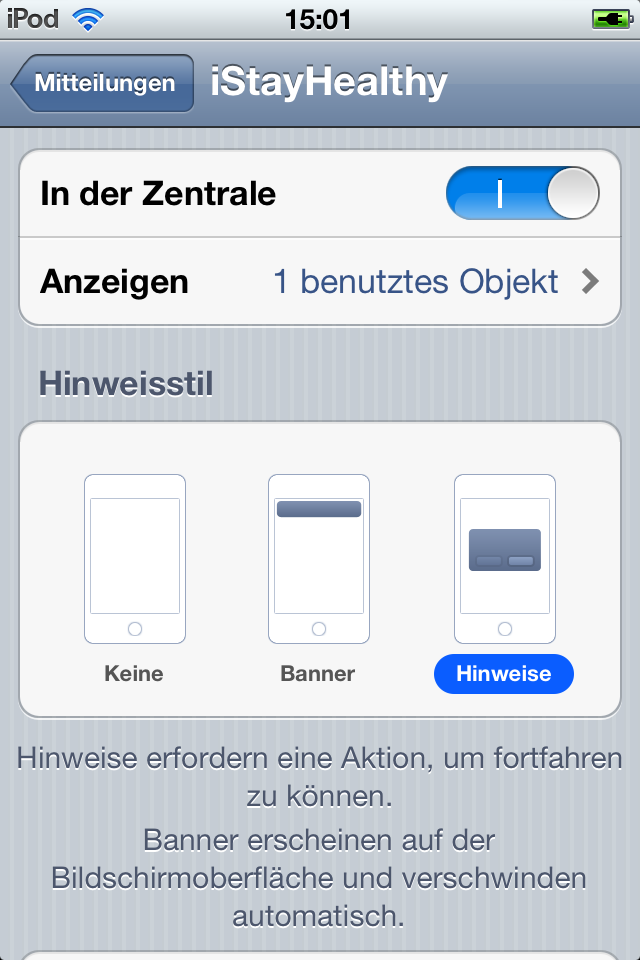
iOS 5  for iPhones/iPads has a new Notification Center tool. This is a very flexible tool. However, per default application alerts and notifications are disabled. This means, after you upgraded your iPhone/iPad to version iOS 5.0 you need to enable your preset alerts in the Notification Tool. 

Follow the steps below
  1. Select the 'Settings' tool on your device
  2. Select Notifications
  3. Select iStayHealthy
  4. Switch 'Notifications Center' to On 


Deutsch
iOS 5 hat ein neues Mitteilungen Tool. Damit alle Deine iStayHealthy Weckereinstellungen funktionieren muss dieses Tool aktiviert werden. Dieses kann mit den folgenden einfachen Schritten bewerkstelligt werden:


  1. Auf dem Home Screen klicke auf 'Einstellungen'
  2. In Einstellungen wähle Mitteilungen aus
  3. In Mitteilungen wähle iStayHealthy aus
  4. In iStayHealthy schalte den Mitteilungen Schalter auf an

Francais
Avis important: vous devrez activer des alarmes dans le nouvel outil des notifications sur votre appareil. aller à la
Réglages-> Notifications-> iStayHealthy
pour activer les alertes, les sons et la notification.


Espanol

Aviso Importante: Usted necesitará para activar las alertas EN LA HERRAMIENTA DE NOTIFICACIONES nueva en el dispositivo. Ir a
Ajustes-> Notificaciones-> iStayHealthy
Para activar las alertas, los sonidos y la notificación.


iStayHealthy v 2.0.1 submitted to fix iOS5 issues

While fixing the issues with setting alerts on iStayHealthy I also revamped the Add/Edit Alert tool. It is now all in one view - rather than having to switch between separate views to set repeats and sounds.

Also, in the Charts (Summary) tool: you can now switch between CD4, CD4% and Viral Load charts by selecting the rows above - in addition to the little buttons on top of the chart.

Friday, 14 October 2011

iStayHealthy iOS5 Problems Found

As I mentioned in the last blog, iStayHealthy crashes when trying to change the default Repeats/Sounds settings in the Alerts tool.
This only happens on the new iOS5 - and it doesn't affect any existing alerts you already set on your system.

I now found what the problem is and will make a new maintenance release available within the next couple of days.


Thursday, 13 October 2011

Setting Sound and Repeats on iStayHealthy for iOS 5

The new version of iOS has just been released. I upgraded my iPad this morning and tested iStayHealthy on the new version of iOS.

iStayHealthy works as before, except for 2 issues that I found on iOS 5. Both of them occur when setting/modifying alarms.

  1. When adding/editing an alert: I changed the default/preset Repeats setting. When selecting a different Repeat the app exits unexpectedly.
  2. When adding/editing an alert I changed the default/preset Sound setting. When selecting a different sound file the app exits unexpectedly.
Other functions of setting alerts are not affected, i.e. you can still set the label and time.

In view of that I will put out a maintenance release to fix this issue.


Wednesday, 5 October 2011

Test run on Android device

As announced earlier, I am currently working to port iStayHealthy to Android. Most of the functionality is there. So today I took the plunge and installed it on an actual device. The device in question is a Nexus One (HTC).

Result: the implemented functions work. Layout is not quite the same as on emulator -  so this still needs some work to make it actually look nice.

Friday, 16 September 2011

Version 2 Has Passed Review

Just got notified that version 2 of iStayHealthy has passed Apple's review and will be uploaded to iTunes. The new version should be available for download within the next 24 hours or so.